
Tesla Model S: Forward Collision Warning
Model S monitors the area in front of it for the presence of an object such as a vehicle, motorcycle, bicycle, or pedestrian. If a collision is considered likely unless you take immediate corrective action, Forward Collision Warning is designed to sound a chime and highlight the vehicle in front of you in red on the instrument panel. If this happens, TAKE IMMEDIATE CORRECTIVE ACTION!
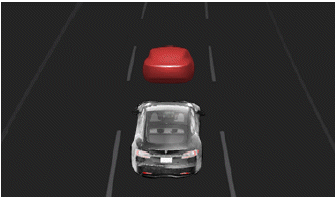
Warnings cancel automatically when the risk of a collision has been reduced (for example, you have decelerated or stopped Model S, or the object in front of your vehicle has moved out of your driving path).
If immediate action is not taken when Model S issues a Forward Collision Warning, Automatic Emergency Braking (if enabled) may automatically apply the brakes if a collision is considered imminent (see Automatic Emergency Braking).
By default, Forward Collision Warning is turned on. To turn it off or adjust its sensitivity, touch Controls > Autopilot > Forward Collision Warning. Instead of the default warning level of Medium, you can turn the warning Off, or you can choose to be warned Late or Early.
NOTE: Forward Collision Warning automatically resets to Medium at the beginning of each drive.
WARNING: The camera(s) and sensors associated with Forward Collision Warning are designed to monitor an approximate area of up to 525 feet (160 meters) in your driving path. The area being monitored by Forward Collision Warning can be adversely affected by road and weather conditions. Use appropriate caution when driving.
WARNING: Forward Collision Warning is designed only to provide visual and audible alerts. It does not attempt to apply the brakes or decelerate Model S. When seeing and/or hearing a warning, it is the driver's responsibility to take immediate corrective action.
WARNING: Forward Collision Warning may provide a warning in situations where the likelihood of collision may not exist. Stay alert and always pay attention to the area in front of Model S so you can anticipate whether any action is required.
Forward Collision Warning operates only when driving between approximately 3 mph (5 km/h) and 90 mph (150 km/h).
WARNING: Forward Collision Warning does not provide a warning when the driver is already applying the brake.
READ NEXT:
 Automatic Emergency Braking
Model S is designed to determine the distance from a
detected object traveling in front of it. When a frontal
collision is considered unavoidable, Automatic
Emergency Braking is designed to apply t
Multi-Collision Braking
In addition to Automatic Emergency Braking, your
vehicle may apply the brakes to prevent or mitigate a
subsequent impact after an initial collision if airbag
deployment is detected. The brakes may
Limitations and Inaccuracies
Collision Avoidance features cannot always detect all
objects, vehicles, bikes, or pedestrians, and you may
experience unnecessary, inaccurate, invalid, or missed
warnings for many reasons, particu
SEE MORE:
Identification Numbers
Vehicle Identification Number (VIN)
VIN Locations
The Vehicle Identification Number (VIN) is visible in 3 locations:
The bottom corner of the driver's side of the windshield
On the driver's side door jamb
Vehicles built before September 2015: On the front crossmember,
benea
Pipe - High Pressure - Charge Port (Dual Motor) (Remove and Replace)
Warning: If the 12V power supply is disconnected, do
not attempt to open any doors with door glass in closed position.
Failure to follow this instruction could result in door glass
shatter.
Note: Before disconnecting the 12V power supply,
ensure that the driver's door window
